How it works
flowchart LR
    Q[Your query] --> T{Only code-like<br/>names?}
    T -- no: a question in words --> G[Rank by meaning<br/>cosine similarity]
    T -- yes: ERR_4291, pg_dump --> M[Merge meaning and<br/>BM25 keyword ranking,<br/>keywords leading]
    G --> R[Top passages with<br/>path, lines, score]
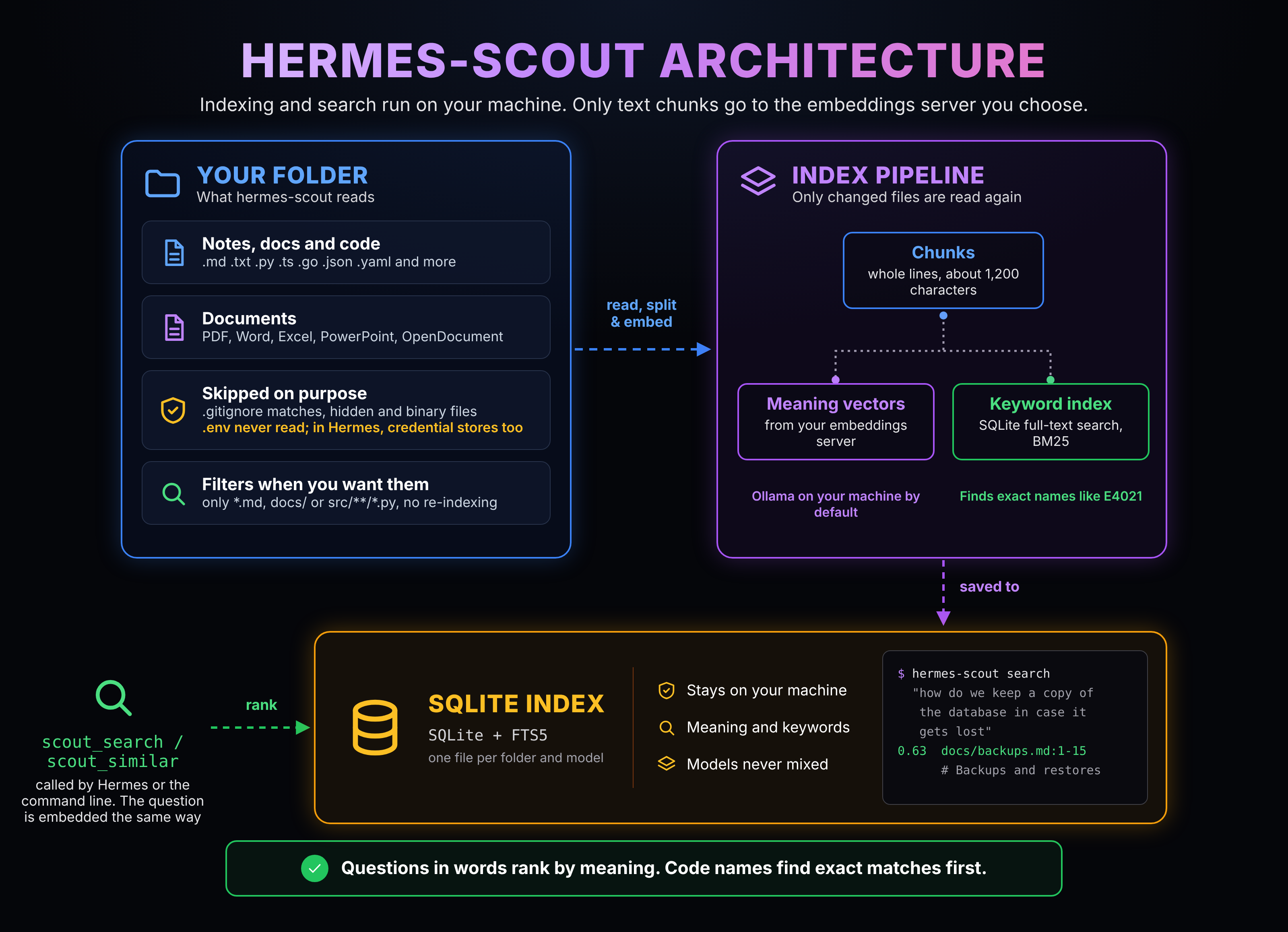
M --> R- Chunking. Text files, and the text of documents, are split into chunks of whole lines (1,200 characters by default). Neighbouring chunks share up to two lines, so a passage that straddles a boundary is still found whole. A line longer than the chunk size is split into pieces, so nothing is cut off.
- Embedding. Chunks are sent in batches of 32 and stored as float32 vectors with precomputed norms.
- Incremental index. The SQLite index is keyed by folder and embedding model. Only new or changed files (by modification time and size) are re-embedded, and deleted files are dropped.
- Ranking. The question is embedded the same way and every chunk gets a cosine similarity,
score = (q · c) / (‖q‖ ‖c‖). The question's words are also looked up in a keyword index (SQLite full-text search with BM25 and word stemming, built alongside the vectors), leaving out filler words such as "how" or "the" that appear everywhere. The defaulthybridranking picks by query: questions in words are ranked by meaning, which the benchmark measured as the most accurate for them; a query made only of code-like names (ERR_4291,pg_dump,getUserById), which embedding models often blur, merges both rankings by score with keywords at 75% and meaning at 25%, so the exact name comes first. Therankingsetting (or the tool'srankingargument, or--ranking) switches to meaning only (semantic) or words only (keyword). If Python's SQLite lacks full-text search (FTS5), search falls back to meaning only and says so in a one-line note. - Find similar.
scout_similaraverages the vectors of a file (or a line range of it) and returns the other files whose best passage is closest, one result per file.
Indexes for different embedding models are kept apart, so switching models never mixes vectors.
What gets indexed
Common text, documentation, code and config extensions (.md, .txt, .py, .ts, .go, .rs,
.json, .yaml, ...). Skipped: hidden files and folders, dependency and build folders
(node_modules, venv, dist, build, ...), symlinks, binary files and files over the size limit.
Inside Hermes, paths Hermes's file tools refuse to read are skipped as well.
Documents
Documents up to 20 MB are indexed by their text, extracted on your machine with Python's standard
library. Each page, slide or sheet starts with a [page N], [slide N] or [sheet Name] line,
and every result from a document starts with the line it falls under, so it says where it came
from even when that line is far above the passage. For documents, a result's lines count lines
of the extracted text, not of the file. Turn documents off with the read_documents setting or
--no-documents.
What works and what does not:
- PDF: text-based PDFs, the usual kind exported from Word, LibreOffice, Google Docs or LaTeX, including accented and non-Latin text when the PDF maps its fonts to Unicode.
- Word (
.docx): body text, tables, footnotes and endnotes. - Excel (
.xlsx): every sheet in workbook order, one line per row with cells separated by tabs. Cells show their stored value: formulas show their last saved result, and dates appear as the number Excel stores for them. - PowerPoint (
.pptx): the text on each slide, in presentation order. Speaker notes are not read. - OpenDocument (
.odt,.ods,.odp): text documents, spreadsheets and presentations from LibreOffice and others, read the same way. - Not read: older
.doc,.xlsand.pptfiles, scanned PDFs (pictures of pages), images and encrypted files. Nothing is guessed: such files simply do not appear in results.
.gitignore
Files and folders that a .gitignore file ignores are left out of the index, the way git would:
.gitignore files in subfolders apply below them, a pattern without a / matches at any depth,
/pattern is anchored to its folder, folder/ matches folders only, ** crosses folders and
!pattern re-includes something an earlier rule ignored. Turn this off with the
respect_gitignore setting or the --no-gitignore flag.
Filters
A search can be limited to some files without re-indexing: *.md (any Markdown file), docs/
(everything in a folder) or src/**/*.py (Python files at any depth under src). Separate several
patterns with commas in Hermes, or repeat -g on the command line.